article by: Glenn Posadas
There are basically many ways to convert your Java source file (.java) or Java class file(.class) into an executable program (means double clicking then run or click+return) for windows.
By the way, I use exe4j and jar2exe ;)
One of these ways is by using a software that will convert your source codes into .exe file.
Example of converters you can use:
1. JSmooth
JSmooth is a Java Executable Wrapper. It creates native Windows launchers (standard .exe) for your java applications. It makes java deployment much smoother and user-friendly, as it is able to find any installed Java VM by itself.
Download:
CLICK HERE (sourceforge)
2. Launch4j
Launch4j is a cross-platform tool for wrapping Java applications distributed as jars in lightweight Windows native executables. The executable can be configured to search for a certain JRE version or use a bundled one, and it's possible to set runtime options, like the initial/max heap size. The wrapper also provides better user experience through an application icon, a native pre-JRE splash screen, and a Java download page in case the appropriate JRE cannot be found.
Download:
CLICK HERE (sourceforge)
3. JexePack
JexePack is a command line tool (great for automated scripting) that allows you to package your Java application (class files), optionally along with its resources (like GIF/JPG/TXT/etc), into a single compressed 32-bit Windows EXE, which runs using Sun's Java Runtime Environment. Both console and windowed applications are supported.
4. exe4j
exe4j is a Java exe maker that helps you integrate your Java applications into the Windows operating environment, whether they are service, GUI or command line applications.
Download:
CLICK HERE
5. jartoExe1.8
Jar2Exe is a tool to convert jar files into exe files.
Download:
CLICK HERE
Example:
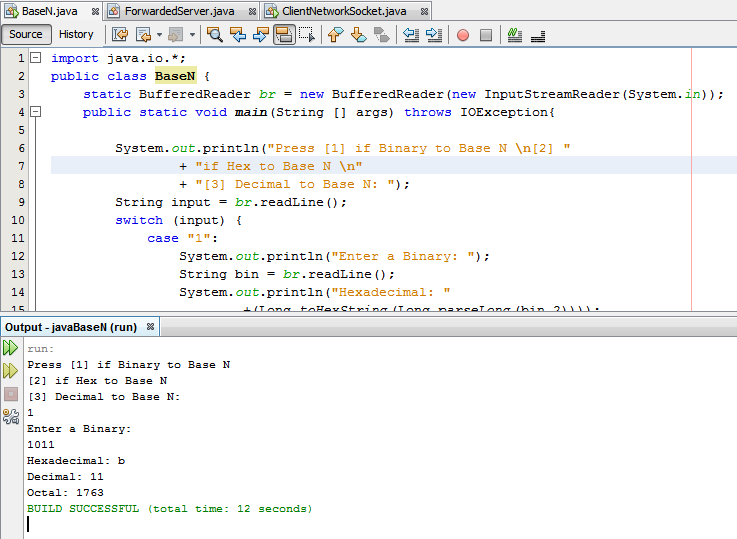
Let us convert this java code to .exe program
OUTPUT (in exe):
Please note that you have to locate your JAR file generated by your IDE/JAVA compiler.
In netbeans, right click the project > properties > Packaging > check the "compress jar file".
Jar file will be under your Dist folder.
(3PM, no lunch yet :( damn Java, I almost forgot how to wrap jar to .exe )
additional tags: If I have a Java source file (.java) or class file (.class). How can I convert it to an .exe file?, compile to exe java, java to exe, java to executable for windows, java to program for windows, conver all java codes to .exe form